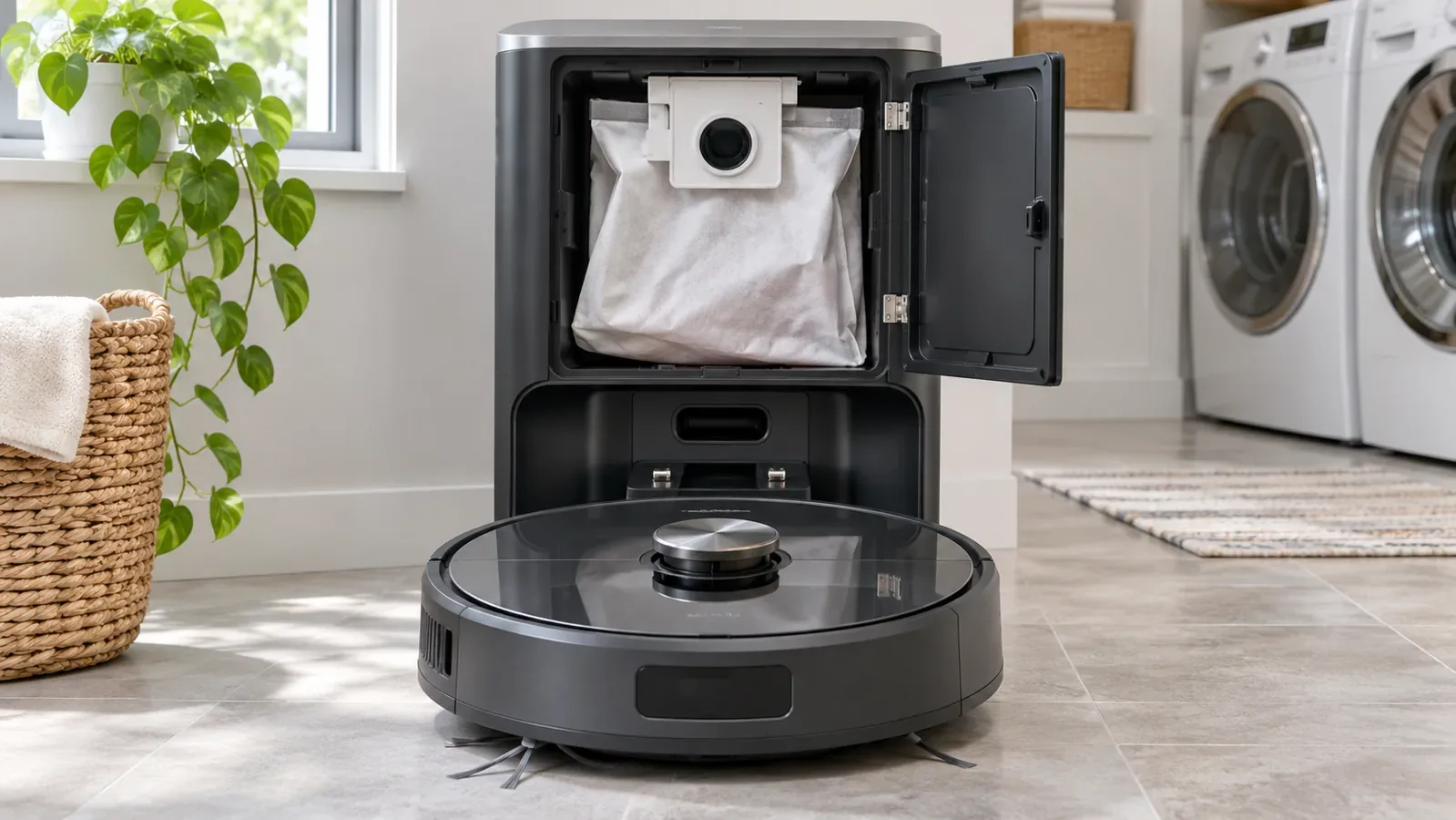
Quick answer: If your robot vacuum returns to the self-emptying dock but its bin stays full, start by checking whether the dock was supposed to run. Auto-emptying may be disabled, quiet hours may be active, or the robot may not have completed a qualifying cleaning cycle. If the station runs but debris stays in the robot, inspect the collection bag, dustbin outlet and user-accessible transfer passage for blockages. Follow your model’s maintenance instructions before opening any compartment.
A robot that charges successfully is not necessarily emptying successfully. Charging contacts, the emptying motor, dust-transfer ports and app controls are different systems. The fastest route to a fix is identifying which one failed, not repeatedly resetting the robot.
First, identify the symptom
| What you see or hear | First place to look | Likely category |
|---|---|---|
| Robot docks and charges; station stays silent | Emptying settings, quiet hours and trigger rules | Emptying was skipped or not requested |
| Station motor starts, but dust remains in the robot | Bag, transfer opening, bin outlet and accessible duct | Restricted airflow or stuck debris |
| Motor starts then stops with an error | Exact error, bag position, cover and permitted maintenance | Component not seated or protective shutdown |
| Robot returns at an odd angle or repeatedly repositions | Ramp, dock placement and alignment | Poor transfer connection or docking problem |
| Problem started after changing a dust bag | Bag collar, lid, seal and dustbin fitting | Something was not reinstalled correctly |
| Works during the day, not overnight | Do Not Disturb settings | Noise-control behavior on supported models |
Before diagnosing a fault, verify the full robot model and the dock package. A standard charging base does not automatically empty a dustbin. Robots sold under similar names can come with different stations. An app icon alone does not prove your package includes a dust-transfer motor.
1. Confirm your station actually has an auto-empty function
Inspect the manufacturer label, purchase configuration and owner’s guide. Self-empty stations have a separate collection arrangement—typically a bag or reusable base container—designed to receive debris from the robot. A compact charger without that hardware cannot empty anything.
This distinction matters when buying replacements or accessories. A robot may be compatible with an optional self-emptying station, yet have been purchased with a charging-only base. Do not order a bag or assume that a firmware update can add hardware that is absent.
2. Check the app’s auto-empty setting
For models with app-controlled collection, open the correct robot’s settings and look for auto-emptying, dust collection or a similarly named control. Make sure it is enabled. Some stations allow emptying after each eligible cleaning cycle; others offer intervals or a manual start command.
Roborock’s official troubleshooting specifically lists disabled auto-emptying as a reason a station stays silent. eufy documents selectable cycle intervals for certain G35+ and G40-series models. These are model-specific examples, not universal menus. If the robot works without an app, use the control method in its own manual rather than guessing at a different model’s settings.
For more on the difference between connected controls and basic local operation, see GlobVacs’ Wi-Fi vs Non-Wi-Fi Robot Vacuums comparison.
3. Check Do Not Disturb and quiet hours
If emptying works at midday but not after an evening cleaning session, check the quiet-hours schedule. Dock suction motors can be loud, so some brands suppress the emptying cycle while Do Not Disturb is active. The robot may still dock and charge as normal.
Roborock, eufy and Philips all describe quiet-hour restrictions for specific supported devices. Check both the start and end time, particularly if your schedule spans midnight. Where the manual permits, run a test outside quiet hours. There is no need to disable a useful household setting permanently just to diagnose the problem.
4. Check how the robot arrived at the dock
A manual return is not always equivalent to finishing a cleaning job. On some systems, lifting the robot onto the dock or sending it home without first cleaning will not trigger automatic emptying. Roborock explicitly lists those conditions for relevant auto-emptying systems, and Philips gives a similar condition for its HomeRun XU7100.
For eufy’s G35+/G40-series support example, a qualifying cleaning cycle is defined by a stated duration. Do not apply that duration to other brands or models. Instead, use your robot’s documented rule.
To test this fairly, start a normal dry-vacuum job in a small, safe area and allow the robot to return under its own control. Observe whether the emptying cycle starts. If the app offers an explicit manual-empty command, test that separately. Do not judge the station solely by what happens after placing the robot on its charger by hand.
5. Inspect the dust bag or base collection container
A full bag is an obvious suspect, but a poorly seated bag can cause a similar problem. The collar may be tilted, the handle may not be fully inserted, or a fold may interfere with the inlet. For a bagless base, the collection bin or lid may not be locked into place, and its filter may need the permitted cleaning procedure.
Unplug the base whenever the manual requires it for servicing. Open only the user-accessible compartment, then check the installed bag or container. Replace a full disposable bag with the correct type. Do not wash a disposable bag unless the manufacturer explicitly allows reuse. Refit the collar and cover exactly as shown in the station’s guide.
Roborock’s instructions for the Auto-Empty Dock Pure and RockDock Plus specifically include checking that the disposable bag is installed correctly. A problem that begins immediately after changing the bag often calls for checking fit before blaming the motor.
6. Inspect the robot’s dustbin outlet and transfer flap
For debris to leave the robot, its outlet must be clear. Tangled hair, carpet fibers, tissue, crumbs and compacted dust can lodge around an outlet flap or collection opening. A flap may be held partly shut, even when the bin itself looks otherwise empty.
Stop the robot using its documented controls, then remove the dustbin according to the manual. Empty loose debris into a suitable waste container. Inspect the user-accessible outlet without forcing hinges, seals or latches. Use the supplied cleaning tool or another method explicitly permitted by the manufacturer. Reinstall the bin completely before the next run.
Do not mistake the robot’s inlet brush opening for the transfer outlet; they can be separate passages. On some Roborock auto-empty configurations, the correctly installed main brush and brush cover are also part of the recommended checks for ineffective emptying.
7. Check the accessible dust-transfer duct for a clog
When the dock motor runs but barely any dirt moves, a blockage in the transfer route is a strong possibility. Long hair, lint and fine debris may compact where the robot’s outlet meets the dock or farther along a duct.
Xiaomi’s Robot Vacuum X10 support guidance specifically calls for checking suction ports and the dust channel for material such as hair and lint. Roborock also provides a duct-access procedure for some named dock models. Those instructions are not permission to unscrew arbitrary panels on every self-emptying station.
Disconnect the station from power before inspecting any user-serviceable duct, as directed by its manual. Clear only debris you can reach through an approved maintenance opening. Do not pour water into the duct, insert sharp blades, force wires into the station, or spray cleaning liquid near its motor. If reaching the obstruction would require opening a sealed electrical compartment, arrange manufacturer service instead.
8. Check dock position, ramp and robot alignment
A robot can make charging contact without necessarily seating perfectly against the dust-transfer interface. A displaced dock, uneven mat, debris on the ramp or obstruction near its approach can change how the robot settles.
Place the station on the firm, level surface required by the manufacturer, with the recommended clearance around it. Check that its power cord cannot get under the robot’s wheels. Watch a normal approach and ensure the robot sits in the intended position. Do not push it into alignment while moving parts are active.
If the robot fails to dock reliably at all, diagnose that navigation issue before investigating the emptying motor. GlobVacs’ guide to why a robot vacuum keeps stopping covers repeated route obstructions, wheel problems and docking behavior separately.
9. Check power and station error indicators
A powerless station cannot run its dust-transfer motor. Confirm the visible power connection and indicator behavior described in the dock manual. If the robot charges but the emptying function remains inactive, settings and trigger rules may still explain it. If neither charging nor emptying works, electrical supply and contact problems deserve attention.
Record any status light, spoken warning or app error before attempting a reset. Some stations may stop a motor to protect it after repeated attempts; Roborock documents a protection-related possibility in its specific dock guidance. Do not repeatedly command the motor to restart while an obstruction may still be present.
If there is smoke, a burning smell, sparking, abnormal heat or repeated breaker trips, stop using the station immediately. Unplug it if safe to do so and contact the manufacturer or a qualified service professional. Do not open or repair internal electrical components yourself.
10. Check the cleaning mode and amount of debris
Not every cleaning task triggers dust collection. Xiaomi’s X10 guidance notes that its auto-empty station does not collect dust after a mop-only task. Other robots may sequence dust emptying, mop washing and drying differently. Review the job type in the app instead of assuming every return must empty the dustbin.
Heavy pet-hair loads can also pack tightly inside a small robot bin. A suction cycle may struggle to pull a compressed clump through a narrow outlet. If the manual permits, empty the robot’s bin by hand, clean accessible outlet surfaces and then run another ordinary cleaning session. If packing is frequent, a supported increase in emptying frequency may reduce the problem.
A household robot’s dry vacuum path is not a wet-waste extractor. Avoid water, damp clumps or workshop debris not permitted by the model instructions. Such material can stick to passages or damage the system.
11. Run one controlled test and inspect the result
After you address a likely cause, reassemble every user-serviceable part. Use a normal cleaning task with ordinary, dry household debris and let the robot finish and dock as designed. Observe whether the station starts and completes the collection cycle.
Then remove the robot’s bin and inspect it. The sound of the dock motor is not proof that debris transferred. If the bin remains packed while the motor runs, an airflow, outlet or alignment problem remains possible. If the station stays completely silent after supported trigger conditions are met, preserve the settings and error details for the manufacturer.
Avoid a factory reset as your first response. It may delete maps, schedules and pairing information without fixing a physical clog or a poorly seated bag. Use a reset only if the exact owner’s guide or support team recommends it for the observed issue.
Brand-specific behavior: what is actually documented?
| Manufacturer example | Relevant documented behavior | Important limitation |
|---|---|---|
| Roborock compatible auto-empty systems | Auto-empty settings, Do Not Disturb, automatic return after cleaning and bag/cover fitting can affect operation | Not every Roborock package includes this station |
| eufy G35+ and G40 series | Eligible cleaning-cycle duration, quiet hours and configurable emptying intervals are described in official support | Do not transfer these timing rules to all eufy models |
| Xiaomi Robot Vacuum X10 | Dust channel, outlet ports, correctly fitted bag and mop-only mode are relevant checks | Rules may differ across Xiaomi model families |
| Philips HomeRun supported models | Power, bag, cover, quiet mode and specific return behavior can matter | XU7100’s documented cycle restrictions are not universal |
The manufacturer’s current manual for your exact robot and dock takes precedence over general troubleshooting articles. App menus, docking arrangements and supported functions change across model generations.
How to prevent repeat emptying failures
The most useful preventive measure is a maintenance schedule based on what your household actually collects. In a pet-heavy home, inspect the robot bin and outlet after the first few sessions to learn whether hair is compacting. Check the dock bag or container as the manufacturer directs, and keep user-accessible seals, passages and filters in the permitted condition.
If emptying frequency is configurable, choose a schedule that suits the debris load without running the dock unnecessarily. A noisy station that starts too frequently can also be disruptive, so balance maintenance against household quiet hours. Watch for recurring clogs at the same flap or seal; that pattern may indicate a worn, damaged or incompatible component rather than simple overfilling.
A self-empty station reduces how often you handle debris, but adds its own maintenance and power requirements. GlobVacs’ article on robot vacuum electricity use explains why charging, standby and powered dock functions belong in the operating-cost picture.
When to stop and contact the manufacturer
Stop troubleshooting and contact support if the station shows the same error after permitted checks, makes a new grinding noise, has a cracked outlet or seal, does not respond to a supported manual-empty command, or requires access to sealed electrical components. Stop immediately for sparking, unusual heat or burning odor.
Have the full robot and dock model numbers, error code, photo of the station label and a short record of the checks performed. That information is more useful than simply reporting that the automatic emptying stopped.
Frequently Asked Questions
Why does my robot vacuum charge but not empty its dustbin?
Charging and emptying are different functions. The emptying cycle may be suppressed by settings, quiet hours or the way the robot returned; alternatively the bag, outlet or transfer duct may be blocked. Distinguish a silent station from a running station that fails to move debris.
Why does my self-emptying base make noise but leave dirt in the robot?
Its motor may run without enough airflow through the intended transfer path. Check the properly fitted bag or collection container, the robot’s outlet, any user-accessible blockage and docking alignment according to the matching manual.
Will the robot empty if I put it on the dock by hand?
Not always. Certain manufacturer-documented systems only auto-empty after a qualifying cleaning task and automatic return. A separate manual-empty command may be available. Check the behavior for your model.
Why does the self-emptying dock stop working at night?
Do Not Disturb or quiet-hours settings can suppress noisy dust collection on supported robots even while charging continues. Review your schedule before treating the station as defective.
Do I need to buy a replacement dock?
Not necessarily. A disabled feature, incorrect bag fit, clogged outlet or interrupted air passage can sometimes be fixed through normal maintenance. A persistent mechanical or electrical fault warrants manufacturer service advice rather than immediate replacement or unsafe dismantling.
Can I wash out the dust-transfer duct?
Do not rinse the station’s internal dust path unless the exact manual identifies a removable washable component and specifies how to clean and dry it. Water near electronics or the dock motor can create an additional hazard.
Do all Wi-Fi robot vacuums have self-emptying stations?
No. Wi-Fi controls and dust-transfer hardware are separate features. The robot must be supplied with or paired to a compatible auto-empty station for that function to exist.
Final verdict
Start with the trigger, then inspect the airflow path. A dock that stays silent is often a settings, quiet-hours or return-condition question. A dock that runs but leaves the bin full calls for inspection of the bag, outlet, transfer passage and alignment. Use the model-specific manual for each maintenance step. When permitted checks do not solve it, contact manufacturer support rather than risking damage to the station.
Manufacturer sources
- Roborock Support — Why auto-emptying is not working
- Roborock Support — Dock emptying effectiveness (Auto-Empty Dock Pure and RockDock Plus)
- eufy Support — Self-emptying on G35+ and G40 series
- Xiaomi Support — X10 auto-empty station not picking up dust
- Philips Support — HomeRun robot does not auto-empty

Abi Khan is the founder and a content writer at GlobVacs. His published work covers vacuum-cleaner buying guides, product comparisons and practical maintenance advice. Read his author profile and selected articles.