
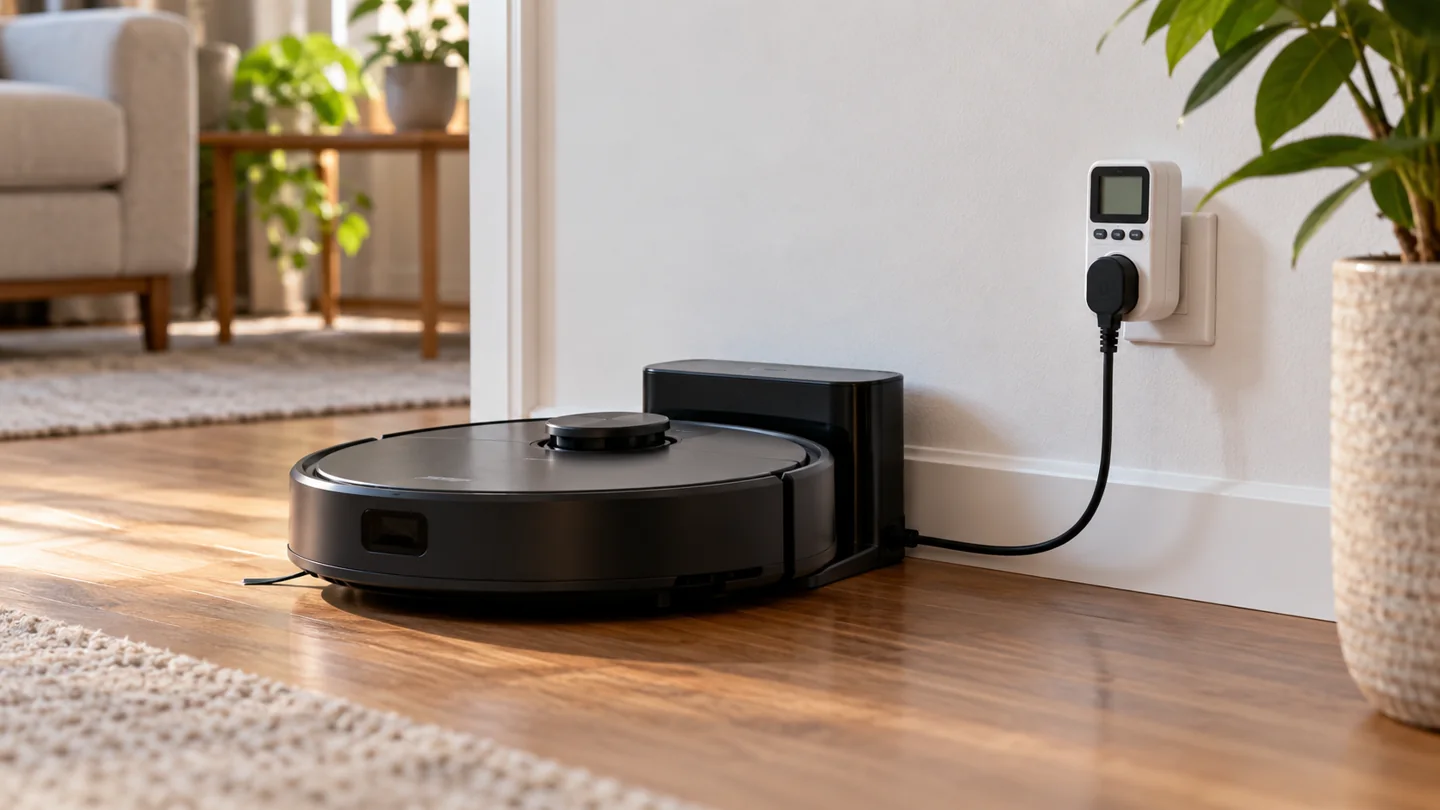
A robot vacuum’s electricity use includes charging losses, standby, cleaning-related recharging, and any powered dock functions. There is no single wattage or monthly cost that applies to every model. A basic charging base and a station that empties dust, washes pads, or heats drying air can have different consumption patterns.
For a useful estimate, measure the complete robot-and-dock system at the wall over several representative days, then multiply its kilowatt-hours by your applicable electricity rate. Do not compare only a robot motor’s rated watts with the input rating of a manual vacuum and call the difference an annual saving.
Watts, watt-hours, and kilowatt-hours
Watts measure power at a moment. Watt-hours measure energy accumulated over time. One kilowatt-hour equals 1,000 watt-hours. Electricity bills commonly charge for energy in kilowatt-hours, so duration matters as well as power.
The arithmetic for a constant load is: energy in kWh = watts × hours ÷ 1,000. A robot system rarely draws one constant power level throughout the day, so measuring accumulated energy can be more useful than watching one instantaneous number.
The U.S. Department of Energy explains these units in its home energy education material. Use your own measured energy and tariff rather than treating an illustrative example as a model specification.
Include the complete system
| Stage | Why it belongs in the estimate |
|---|---|
| Battery charging | Wall energy is used to replenish the robot, with conversion losses |
| Docked standby | The system may continue supporting readiness, electronics, or connectivity |
| Auto-emptying | A station may run a separate motor to transfer debris |
| Mop washing or pumping | Water-handling functions can use additional powered components |
| Heated drying or water heating | Supported stations can have intermittent heating loads |
| Repeated failed jobs | Extra sessions and repeated docking attempts can change total use |
Not every robot has every stage. Check the exact station and settings. A dock’s maximum input rating is not the same as its average draw across a full day.
How to measure practical household consumption
- Choose a suitable energy meter. Use a reputable plug-in meter rated for the supply, socket, and complete station’s electrical load.
- Follow all electrical instructions. Keep the setup dry and do not use damaged cords, loose adaptors, or overloaded connections.
- Measure the whole dock system. Include the normal charging arrangement rather than only a separate low-power component.
- Record a representative period. Include ordinary cleaning days and standby days, plus the station functions you normally use.
- Read accumulated kWh. Note the duration, number of jobs, settings, and any unusual interruptions.
- Repeat if conditions change. A different schedule, drying setting, or cleaning area can alter the result.
Use the meter’s instructions and do not modify wiring. If you are unsure whether the equipment is appropriately rated or the outlet is sound, seek electrical advice before using it.
Calculate cost from measured energy
The basic calculation is: cost = measured kWh × applicable price per kWh. If your bill has time-of-use rates, tiered charges, or other adjustments, use the relevant rate structure. A single flat-rate example will not reproduce every bill.
Here is a hypothetical calculation, not a measured robot result: a complete system uses 0.80 kWh across seven days. Over 30 days at the same pattern, that is about 3.43 kWh. At an illustrative rate of $0.20 per kWh, the energy charge would be about $0.69. Your consumption, currency, and tariff can differ.
| Hypothetical input | Calculation | Result |
|---|---|---|
| Seven-day measured energy | Meter reading | 0.80 kWh |
| Thirty-day estimate | 0.80 × 30 ÷ 7 | About 3.43 kWh |
| Illustrative energy cost | 3.43 × $0.20 | About $0.69 |
Keep the example labeled. Do not publish its result as “the monthly cost of a robot vacuum” without actual model-specific measurements.
Standby can matter because it lasts longer
A low draw maintained for many hours can contribute to total energy. Conversely, a brief high-power station cycle can look alarming on an instantaneous display while contributing relatively little over a month. Measure duration and accumulated energy together.
The Department of Energy’s standby-power guidance explains the value of averaging over time when consumption fluctuates. A reading at one moment is not a complete daily profile.
Some robots provide a reduced-power mode for periods without use. iRobot’s reduced-power standby guidance explains that supported modes can suspend functions such as connectivity and scheduled cleaning. Read the effects before enabling one.
Do not unplug indiscriminately
A robot may be designed to remain on its powered dock during normal use. Disconnecting it after every session can interfere with readiness, schedules, or the manufacturer’s charging routine. Follow the exact product instructions.
For example, Roborock’s robot charging guidance addresses staying connected after charging. Long-term storage can require a different process from normal daily operation.
Do not use an improvised timer or incompatible smart plug to interrupt a station’s operation without checking whether the manufacturer permits it. Energy planning should preserve safe charging and the intended shutdown process.
Compare robots and manual vacuums fairly
Compare energy for the cleaning work you actually need, including frequency and duration. A manual vacuum may operate at a higher input power for a shorter session. A robot may run more often and remain docked between jobs. Either comparison needs measured or clearly defined assumptions.
Also account for work that remains manual. If the robot does not replace stair, upholstery, or occasional carpet cleaning, those tasks remain part of the household routine. Do not claim the robot eliminates all manual-vacuum energy.
Purchase price, consumables, battery replacement, repair, and electricity are separate ownership costs. A small electricity estimate does not establish the cheapest overall machine.
Reduce avoidable energy use without reducing useful cleaning
Prepare a route the robot can finish, maintain brushes and wheels, clear the intake, and use an effective permitted setting. Avoid scheduling repeated jobs that miss the same inaccessible area. Use supported room selection where it solves a real need.
Choose drying and station settings according to the manual and hygiene requirements rather than switching them off blindly. A damp dirty pad left unmanaged is not a sensible saving.
See robot scheduling, usable battery time, and maintenance for the operational decisions.
Frequently asked questions
Can I use the battery’s capacity as the wall consumption?
Not directly. Battery energy and energy drawn from the wall differ because of charging losses, standby, and station functions. Measure the full system for a household estimate.
Does off-peak scheduling reduce kWh?
Changing the clock time alone does not necessarily reduce energy. It may change cost under a time-of-use tariff. Keep cost and consumption separate.
Are all robot vacuums more efficient?
No universal comparison is established here. Define equivalent cleaning work and include the complete system before drawing a conclusion.
Measure first, then calculate
A representative kWh reading, a clear measurement period, and the correct tariff give a defensible estimate. Generic wattage claims and motor-only comparisons do not capture the full robot-and-dock routine.
Further reading

Katy James contributes vacuum-cleaner explainers and practical cleaning guidance at GlobVacs. Her published topics include robot-vacuum operation and vacuum airflow. Read her author profile and selected articles.