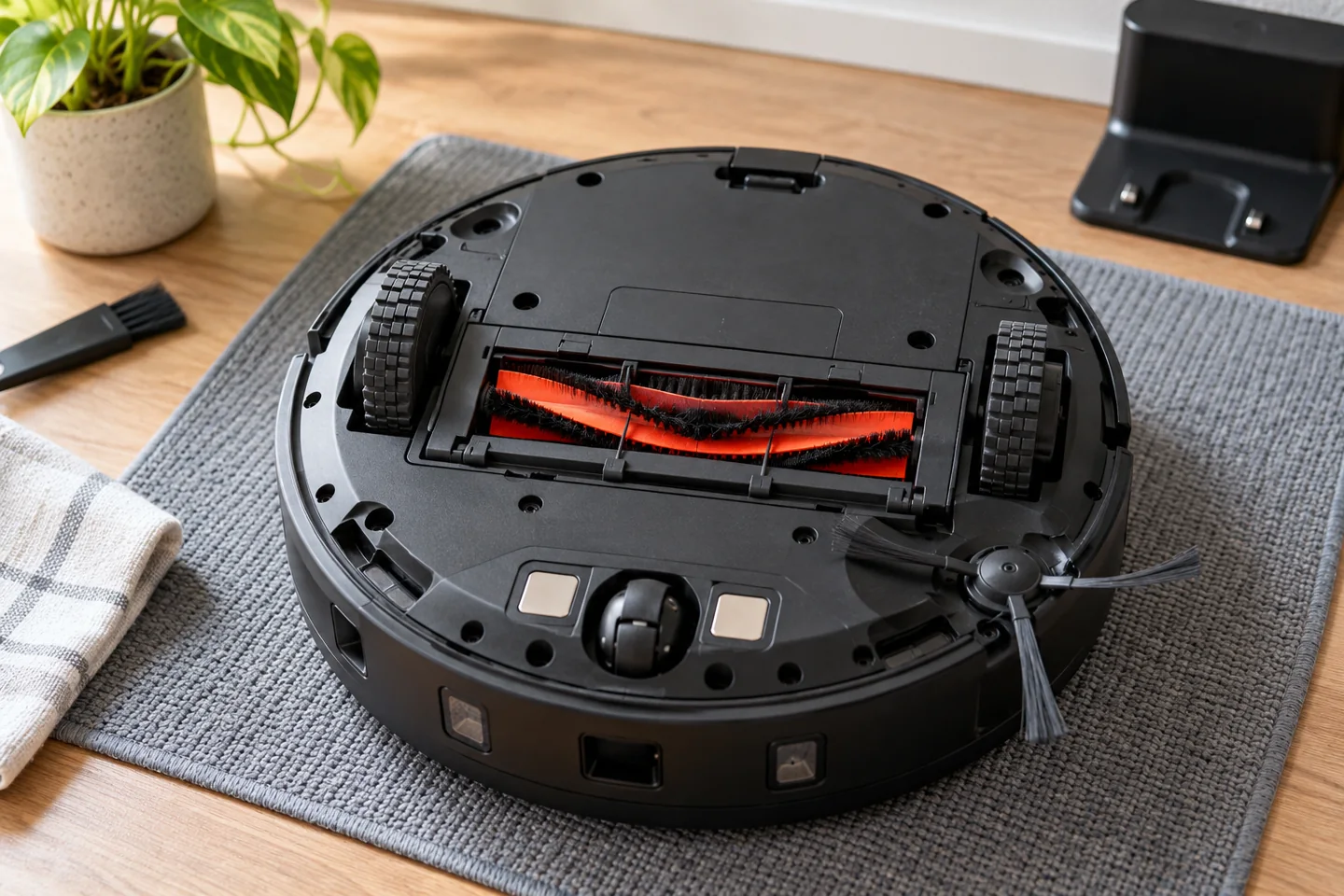
A robot vacuum combines a small vacuum-cleaning system with battery-powered movement, sensors, and software that decide where it travels. Brushes and airflow collect suitable debris into an onboard bin; wheels move the machine; navigation helps it cover accessible floor space and return to its dock. The exact capabilities depend on the model.
Not every robot creates a room map, recognizes small objects, empties its own bin, or mops. Understanding those separate systems helps you choose realistic features, prepare your home, and diagnose problems without assuming an app or a laser sensor guarantees complete cleaning.
The main systems inside a robot vacuum
| System | What it does | What it does not guarantee |
|---|---|---|
| Cleaning head and airflow | Collect loose debris from compatible surfaces | Removal of every embedded particle or stain |
| Bin and filters | Contain collected debris and filter the airflow | Maintenance-free operation or universal HEPA performance |
| Drive wheels and caster | Move and turn the robot | Safe passage over every threshold or loose rug |
| Navigation sensors and software | Estimate position, detect some conditions, and plan movement | Recognition of every cable, pet accident, or drop |
| Battery and dock | Power the robot and recharge it | The same usable runtime in every room or mode |
| App or remote | Provide supported controls and settings | Mapping or room selection unless the model offers them |
How the cleaning system collects dirt
A side brush, where fitted, directs some debris toward the main intake. A central roller or another cleaning arrangement helps release material from the floor. The fan moves air through the intake and collection path, carrying suitable debris into the bin.
The robot then separates debris from the airflow and returns filtered air through its exhaust. The bin is not an airtight box that permanently stores all incoming air. Like other vacuums, the robot needs an open, correctly assembled airflow route. In a garage, the debris matters as much as the floor: our guide to robot vacuums for garage floors explains the limits around ordinary dry debris, moisture and workshop mess.
A full bin, blocked intake, tangled roller, or loaded filter can reduce pickup even when navigation looks normal. Conversely, a strong cleaning head is of limited use if the robot never reaches the dirty area. Our guide to vacuum-cleaner mechanics explains the shared airflow principle.
Some robots use a reactive movement pattern. They detect contact or nearby obstacles, turn, follow edges, or use programmed movement behaviors to cover an area. Repeated passes can collect debris without an editable map of individual rooms.
This does not mean the machine has no sensors or software. It means you should not expect map-based features merely because it can avoid some objects or connect to a phone. Coverage time and repeated visits can differ from a model that plans a systematic mapped route.
For a concrete product example, our Shark AV752 ION review distinguishes its reactive navigation from room-mapping features. Check the exact model rather than assuming all robots from a brand share the same system.
Other robots estimate their location and plan more orderly routes using combinations of sensors. Depending on the design, these can include wheel-motion information, gyroscopes, optical tracking, cameras, or laser-based distance sensing. The available map controls depend on both hardware and software.
LiDAR uses light-based distance measurements; it does not simply sense room temperature. Camera navigation uses visual information, but having a camera does not automatically mean the robot provides remote video viewing or identifies every object on the floor.
For example, the manufacturer identifies LiDAR mapping on the original Roborock Q5 series. Our Q5 review explains what that means for cleaning control and how the dock bundle differs. Do not confuse the original Q5 with later models that have similar names.
A cleaning-history image is not always an editable saved map. Before buying, check whether the robot supports room labels, no-go zones, multi-floor maps, and targeted cleaning as separate features.
Obstacle detection is different from obstacle recognition
A bumper can respond after contact. A proximity sensor can help detect something nearby. A more advanced recognition system may identify certain object categories. These capabilities are not interchangeable, and their performance varies with lighting, object size, shape, and placement.
Prepare the route even when the robot advertises obstacle avoidance. Pick up cables, socks, loose packaging, small toys, and items that can become entangled. Check for pet accidents before any unattended run. A feature list is not a guarantee against spreading contamination.
Cliff sensors are another separate system. They help detect some drop conditions but should not be treated as an infallible barrier. Follow the manual’s requirements around stairs and unsafe areas. Do not tape over sensors to make the robot cross a dark rug.
How a robot knows when to stop
A run may end because the programmed cleaning task is complete, the battery reaches a return threshold, an error occurs, or a schedule or user command stops it. Some robots can recharge and resume an unfinished mapped job; others do not offer the same behavior.
Returning to the dock does not necessarily mean every accessible floor area was cleaned. Check the job status and actual result. A robot that repeatedly stops under a chair needs a route or mechanical investigation, not simply a longer schedule.
Our guides to how robots decide to stop and unexpected stopping cover those different questions.
What the charging dock does
A basic dock provides a location where the robot can align its contacts and recharge. Docking methods vary, so the robot needs the approach space and placement described in its manual. Moving the dock during a job can complicate return behavior on some models.
An auto-empty dock adds a debris-transfer system, usually with its own container or bag. A more elaborate station may also handle mop washing, water, or drying. None removes every maintenance task: bags fill, paths block, pads need care, and containers need the specified cleaning.
Roborock’s docking troubleshooting illustrates the importance of the dock’s signaling area and robot sensor condition. Use the matching instructions for your machine rather than applying one brand’s contact-cleaning method to another.
How robot mopping differs from vacuuming
A vacuum-and-mop model adds a pad and water-delivery arrangement. Some drag a damp pad; others move pads or provide additional mechanical action. Water control, pad lifting, carpet handling, and station functions differ substantially.
Check the floor manufacturer’s wet-cleaning requirements before enabling the feature. Do not assume every vinyl or laminate floor permits the same method. Use only the cleaning solution allowed by both the robot and floor instructions.
A robot mop does not automatically extract a large wet spill, sanitize a floor, or remove every dried stain. Keep suitable manual tools available for spills and the places the machine cannot safely reach.
What Wi-Fi adds—and what it does not
Connectivity can provide scheduling, notifications, supported map controls, and integrations. Some robots retain basic physical or remote controls without a network; others require connectivity for particular functions or setup. Verify offline behavior before buying for a home without Wi-Fi.
Read privacy information for camera features, maps, remote access, cloud accounts, and account deletion. A camera-free robot may still transmit other data, while a connected robot may retain some offline functions. These are separate questions.
Our non-Wi-Fi robot-vacuum guide focuses on control needs. Use it alongside the exact model’s current manual and support information.
Maintenance keeps the systems working together
Empty the bin at its limit, remove accessible tangles, maintain filters by their own instructions, and inspect wheels and sensors. Do not wash a filter or bin merely because another model allows it. Keep the body and electrical components dry.
Manufacturer care instructions show the variation: iRobot’s Roomba 600-series guidance specifies nonwashable filters for that family. Other robot families can use different components and procedures. Our robot-maintenance guide explains how to organize those checks.
Frequently asked questions
Does every robot map the house?
No. Reactive navigation, route-history displays, and editable saved room maps are different capabilities. Check the exact model’s controls and manual.
Can a robot replace all manual vacuuming?
It can reduce routine work on accessible compatible floors. Stairs, upholstery, narrow gaps, some rugs, and occasional more demanding cleanup still need other tools. See whether a robot can replace a normal vacuum.
Is a higher suction figure always better?
No. Head design, airflow, surface compatibility, navigation, and maintenance affect the result. Compare like-for-like evidence rather than treating one advertised figure as complete cleaning performance.
Judge the whole cleaning routine
A useful robot reaches the areas you need, collects the debris your floors accumulate, returns reliably, and is practical to maintain. Understand cleaning, navigation, docking, and connectivity as separate systems before deciding which features matter in your home.

Katy James contributes vacuum-cleaner explainers and practical cleaning guidance at GlobVacs. Her published topics include robot-vacuum operation and vacuum airflow. Read her author profile and selected articles.